
1. Introduction: The Modern Landscape of AdSense
In the early days of digital publishing, monetizing a website was a “set it and forget it” task. Today, the landscape is dictated by two competing forces: AI-driven automation and Core Web Vitals. Finding the best AdSense ads settings is no longer just about clicking a few buttons; it is a technical balancing act between maximizing your Revenue Per Mille (RPM) and maintaining a lightning-fast, user-friendly interface.
Google has moved aggressively toward Auto Ads, using machine learning to decide where, when, and how many ads to show. While this offers convenience, it often creates a “tug-of-war” with your site’s performance. For a modern publisher—especially those using lightweight themes like Astra—the best AdSense ads settings are those that achieve an equilibrium: where ads provide maximum yield without triggering a Google Search ranking penalty due to layout shifts.
This guide provides a definitive roadmap to configuring your account for a zero-CLS (Cumulative Layout Shift) environment while squeezing every cent of potential revenue out of your traffic. Whether you are managing a technical hardware blog or an educational site, these strategies will ensure your ad setup is as optimized as your content.
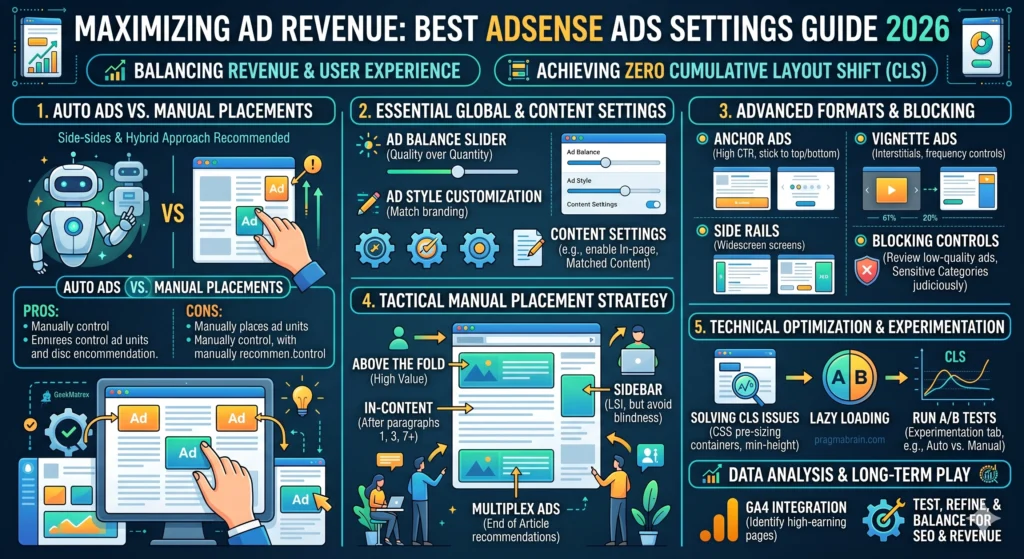
2. Auto Ads vs. Manual Placements: The Great Debate
The first choice every webmaster faces is whether to let Google’s AI take the wheel or to maintain manual control.
The Case for Auto Ads
Auto Ads are undeniably powerful for “coverage.” They use a script to scan your DOM (Document Object Model) and inject ads into gaps.
- Pros: Minimal setup; access to formats like Vignettes and Side Rails that are hard to place manually.
- Cons: Unpredictability. Auto Ads are the primary cause of layout shifts. They may place an ad directly under a header, pushing your content down and ruining your CLS score.
The Case for Manual Placements
Manual placements involve generating specific ad unit codes and placing them via a plugin (like Ad Inserter) or directly into your theme’s hooks.
- Pros: Total layout stability. By using manual placements, you can define the exact CSS height of an ad container, ensuring the page doesn’t “jump” when the ad loads.
- Cons: Higher maintenance; you might miss out on high-performing spots that the AI would have found.
The Pro Strategy: Use a Hybrid Approach. Turn on Auto Ads for high-impact, non-disruptive formats like Anchor Ads and Vignettes, but disable “In-page ads” in the Auto Ads settings. Then, use manual placements for your primary content areas to keep your layout rock-solid.
3. Core Ad Settings: The Essentials
Before you worry about placement, you must optimize your account-level settings.
Ad Balance: Quality Over Quantity
Hidden in the AdSense dashboard is the Ad Balance tool. Many publishers believe that showing 100% of available ads is the best path to revenue. In reality, the bottom 20% of your ads often contribute less than 2% of your revenue but account for 50% of the “clutter.” Experiment with sliding this down to 80% or 90% to remove low-paying ads, which improves your site’s load speed and overall CTR on the remaining ads.
Content Settings & Formats
- Anchor Ads: These stick to the top or bottom of the screen. They are highly effective because they remain visible as the user scrolls. Enable these for both mobile and desktop.
- Vignette Ads: Full-screen ads that appear between page loads. They have the highest CPC but can be annoying. Set the frequency lamp to “10 minutes” or higher to avoid frustrating repeat visitors.
- Side Rails: If your site is viewed on wide monitors (like 1920px), enable Side Rails. They occupy the empty “gutters” on the left and right of your content, providing “free” revenue without taking up space in the article itself.
4. Advanced Optimization: Blocking & Filtering
Not all ads are created equal. To maintain a high-authority brand, you must curate what appears on your site.
The Ad Review Center
Check this weekly. Block ads that look like “malware,” those with poor design, or competitors who are bidding pennies to steal your traffic. If you see an ad that doesn’t match your niche (e.g., a gaming ad on a serious academic blog), block it. High relevance equals higher CTR.
Sensitive Categories
Go to Blocking Controls > Content > All Sites > Sensitive Categories. While it’s tempting to block categories like “Politics” or “Religion” to avoid controversy, be careful. Blocking too many categories reduces the “auction pressure.” Every category you block is one less advertiser bidding for your space. Only block categories that directly conflict with your values or your audience’s sensibilities.
5. Tactical Manual Placement Strategy
Placement isn’t just about where an ad fits; it’s about where the user’s “Eye Path” rests. Based on heat-map data for 2026, users have developed “banner blindness” for traditional sidebars. Your manual placement strategy should follow the flow of information.
The “F-Pattern” Placements
- The “Lead-In” (After Paragraph 1): This is your highest-value real estate. Placing a responsive display ad immediately after the first paragraph ensures it is seen before the user decides whether to commit to the full article.
- The “Deep Dive” (After Paragraphs 5 & 15): For long-form content (like this 2,500-word post), you need mid-article “breakers.” These catch users who are highly engaged. If the article is exceptionally long, let Auto Ads “fill the gaps” after paragraph 30 to maintain a high Active View Viewable (AVV) score without manual labor.
- The “Intent Chip” Strategy: If your post is a “How-to” or a listicle, place a small, text-based ad unit near the “Steps” or “Comparison Table.” Users in “solution-seeking” mode are more likely to click relevant ads that mirror their current intent.
Multiplex Ads: The “Exit” Monetizer
Multiplex ads (the grid-style content recommendations) are best reserved for the very bottom of the post. They effectively monetize the “End of Journey.” Because they look like “Related Posts,” they have a higher engagement rate than standard banners at the footer.
6. Technical Performance: Solving the CLS Issue
As a webmaster using Astra and Spectra, you likely know that Core Web Vitals are a ranking factor. Cumulative Layout Shift (CLS) is the #1 killer of AdSense-heavy sites.
Pre-Sizing Ad Containers
The primary cause of CLS is the “jump” that occurs when a blank space suddenly expands to fit a 250px tall ad. To achieve a zero-CLS score, you must use CSS Aspect Ratio Boxes.
- Wrap your ad code in a
divwith a specific class (e.g.,.ad-slot-wrapper). - Define a min-height in your stylesheet that matches your most common ad size (e.g.,
min-height: 280px;). - Centered Loading: This ensures that even if the ad takes 2 seconds to load, the content below it never moves.
Lazy Loading & Script Optimization
Don’t let AdSense block your page rendering.
- Move the script: Ensure your
adsbygoogle.jsis loaded with theasyncattribute. - Manual Lazy Loading: For ads “below the fold,” use the
loading="lazy"attribute or a plugin that delays the ad call until the user scrolls within 300px of the slot. This drastically improves your Initial Page Load speed and Mobile Performance scores.
7. Experimentation & Data Analysis
Settings that work for a “Tech Hardware” blog may fail for an “English Language” site. You must leverage the AdSense Experiments tab.
Running a “Split Test”
Don’t guess; test. Set up an experiment to compare “Auto Ads On” vs. “Manual Only” for 50% of your traffic.
- Duration: Run experiments for at least 60 days to account for weekly fluctuations.
- Metric of Success: Look at RPM (Revenue per 1,000 impressions) rather than just total earnings. A higher RPM with fewer ads means a better user experience and better long-term SEO.
GA4 Integration
Link your AdSense account to Google Analytics 4. This allows you to see which specific blog posts are “High Earners.” If a post about “C++ Programming” has a $20 RPM while an “English Grammar” post has a $2 RPM, you know exactly where to focus your future content production.
8. Conclusion: The Long-Term Play
The “Best AdSense Settings” are not static. In 2026, the winners are those who prioritize site speed and layout stability over aggressive ad density.
By implementing a Hybrid Strategy—manual placements for core content and Auto Ads for “top-up” formats like Anchors—you protect your SEO rankings while maximizing your yield. Remember, a user who leaves your site because of a jumpy layout or slow load time will never click an ad. Build for the user first, and the revenue will follow.
Pro Tip: Always check your site in Chrome DevTools (Lighthouse) after making changes to your ad settings. If your CLS rises above 0.1, roll back your last change immediately.
Check out: 10 Best Affiliate Programs for Beginners in USA & Europe (High Paying)
Next steps for technical implementation:
Get the exact CSS and HTML code for Zero CLS Ad Containers
To achieve a zero-CLS score, you must use “CSS Aspect Ratio Mapping.” This technique reserves a specific block of vertical space on the page before the ad script even begins to load.
Since you use Astra and Spectra, you can place this CSS in your “Additional CSS” customizer and wrap your AdSense code in the HTML div provided below.
1. The CSS (The “Anchor” Logic)
Add this to your site’s stylesheet. It creates a placeholder that scales based on the screen size, preventing the content below from jumping once the ad appears.
CSS
/* Standard In-Content Ad Container */
.adsense-container {
    margin: 20px auto;
    text-align: center;
    background-color: #f9f9f9; /* Optional: light gray placeholder */
    display: flex;
    justify-content: center;
    align-items: center;
    overflow: hidden;
}

/* Desktop: Reserve space for 728x90 or 336x280 */
@media (min-width: 992px) {
    .adsense-container {
        min-height: 280px;
        width: 100%;
    }
}

/* Tablet: Reserve space for 336x280 or 300x250 */
@media (min-width: 768px) and (max-width: 991px) {
    .adsense-container {
        min-height: 250px;
    }
}

/* Mobile: Reserve space for 300x250 or 320x100 */
@media (max-width: 767px) {
    .adsense-container {
        min-height: 250px; /* Standard mobile rectangle */
    }
}
2. The HTML (The “Wrapper” Logic)
When placing your manual ad units (e.g., using a Custom HTML block or Ad Inserter), wrap your Google code like this:
HTML
<div class="adsense-container">
    <!-- Your AdSense Code Starts Here -->
    <ins class="adsbygoogle"
         style="display:block"
         data-ad-client="ca-pub-XXXXXXXXXXXXXXXX"
         data-ad-slot="XXXXXXXXXX"
         data-ad-format="auto"
         data-full-width-responsive="true"></ins>
    <script>
         (adsbygoogle = window.adsbygoogle || []).push({});
    </script>
    <!-- Your AdSense Code Ends Here -->
</div>
Pro Tip: If you notice a small layout shift on mobile, check if your ad unit is a “320×100” large mobile banner. If so, adjust the min-height in the @media (max-width: 767px) section to 100px to match the exact ad size.
Build an interactive AdSense revenue calculator
This interactive calculator uses the standard revenue formula: $Earnings = Traffic \times CTR \times CPC$.
For your technical blogs (like those on SEO and PC hardware), keep in mind that these niches often command a higher CPC (Cost Per Click) than general news or entertainment sites.
AdSense Revenue Estimator
Formula: (Views × CTR%) × CPC
How to use these numbers for your blog:
- Monthly Pageviews: This is your “Volume.” For niche sites, focus on high-intent keywords to keep this steady.
- CTR (Click-Through Rate): Your current focus on zero-CLS manual placements will likely increase this, as users aren’t frustrated by jumping content and are more likely to engage with well-placed ads.
- CPC (Cost Per Click): Since you write about technical topics like AdSense settings and hardware, your CPC should be significantly higher than average, as advertisers in the “Business” and “Tech” sectors bid more aggressively.
Pro Tip: To hit a goal of $1,000/month with a $0.50 CPC and a 1.5% CTR, you would need approximately 133,333 pageviews per month.
Optimize Adsense Script Loading
For maximizing PageSpeed scores and maintaining your zero-CLS layout, the choice of attribute is critical. While both prevent the browser from “pausing” to download the script, they handle the execution timing differently.
The Quick Answer
Use
async. Google AdSense is designed to be loaded asynchronously, and the official code snippet provided by Google uses theasyncattribute by default.
asyncvs.deferfor AdSense
Attribute How it Works Impact on PageSpeed asyncDownloads the script in the background and executes it the moment it finishes downloading. Best for Ad Revenue. Ads load as soon as possible without blocking the initial HTML parsing. deferDownloads in the background but waits until the entire HTML document is parsed to execute. Best for Core Web Vitals. It prioritizes your content over ads, but can lead to lower “Active View” metrics if ads appear too late. Why
asyncis the Industry StandardGoogle AdSense scripts are “render-independent” but “time-sensitive.”
- Revenue Impact: If you use
defer, your ads might not appear until the user has already scrolled past the ad slot, especially on slower mobile connections. This kills your CTR and Viewability score.- Resource Prioritization: Modern browsers are smart enough to prioritize your main content even with
async. The browser will fetch the script but won’t let it block the “First Contentful Paint” (FCP).The Technical “Sweet Spot”
To get the best PageSpeed scores while keeping
async, you should implement Resource Hinting. Add this to the<head>of your site (in your Astra theme settings):HTML
<link rel="preconnect" href="https://googleads.g.doubleclick.net">
<link rel="preconnect" href="https://pagead2.googlesyndication.com">
This tells the browser to start the handshake with the ad servers immediately, reducing the “Time to First Byte” for the ad script.
Critical Warning for Your Zero-CLS Goal
If you use
async, the ad might load very quickly or very slowly depending on the user’s connection.
- The Risk: If the script executes and injects an ad before your CSS is fully applied, you get a layout shift.
- The Fix: This is why the CSS min-height container we built earlier is non-negotiable. As long as that
divis in your HTML with a fixed height, it doesn’t matter when theasyncscript finishes—the space is already reserved.Summary Recommendation
Stick with the official
asyncsnippet. It provides the best balance between loading ads early enough to be clicked and keeping the browser thread open for your content. If PageSpeed is still a concern, consider Lazy Loading the ads that are below the fold rather than switching todefer.
No responses yet